
Write on paper.
Get instant AI‑powered evaluation.
Take a photo of your child's handwritten homework or answer sheet. Murrics platform evaluates the handwritten answer sheet question by question, shows the marks earned, highlights mistakes, explains where marks were lost, and identifies what to practice next.
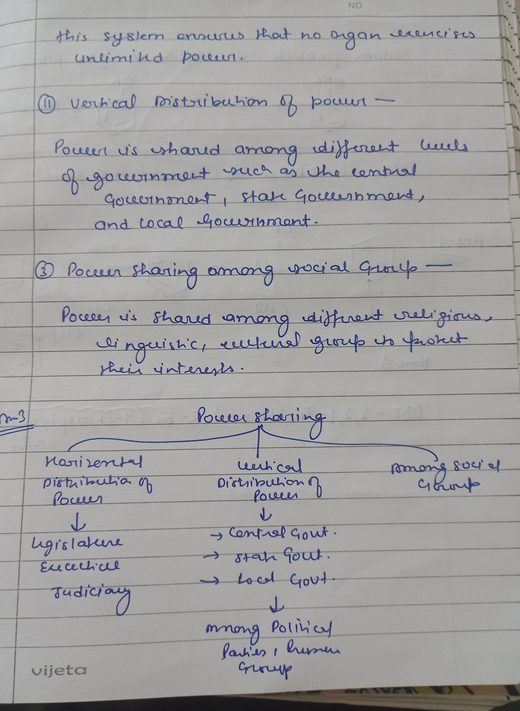
Murrics platform evaluates handwritten answers across subjects—including for Maths, Science, English, Social Studies — even mathematical symbols & diagrams. Every mistake is marked on your child's own page. You get the personalized feedback, and see the topics they are good at and the ones they keep getting wrong. It helps child to understand mistakes while reducing exam anxiety, and practice to fix them.
AI Evaluation = Marks + Mistakes + Explanations + Strengths & Weaknesses + Practice Suggestions + AI Insights + Learning Progress
More than marks — understand what your child knows, where they struggle, and what to practise next.
Parent–Child Harmony Check-in- Free plan — no card required
- Your child needs no login
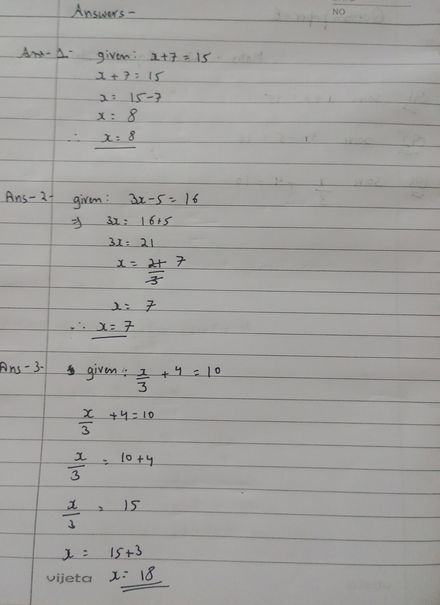
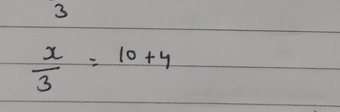
A pile of sheets is a pile of sheets — whether it's one child's or thirty.
I'm a parent
Photograph tonight's homework. Marks, feedback and one next step come back in minutes, for each of your children.
Start free with GoogleSign in and you're marking in a minute
I teach a batch
Photograph the pile after class. Split by student, marked against your rubric, and held until you approve it.
Start free with GoogleSign in and you're marking in a minute
Same sign-in, same evaluation engine. Only the pile size is different.
- Reads handwriting work & diagrams
- Any board · CBSE mapped to chapters
- Your child's data stays private
- Free to start — no card required
You know she's struggling.
Nobody can tell you where.
The test result score is 62%. The report card says “needs improvement”. However, the report card fails to specify which topics need work or if previous weak areas ever got fixed. Marking the paper yourself costs an evening you don't have or afford to lose—and by the time you do, your child has already lost interest in it.
Don't just get a score.
Get your page back, marked and explained.
Murrics platform highlights mistakes your child made, — on their own page. Tap a mark to see what went wrong and get suggestions what to practice next.
- A box on the exact (or almost near) step. Not a grade at the top of the page — a box around the line that lost the marks.
- One tap explains it. No teacher jargon. Just what went wrong, and what to do next time.
- The full list sits beside it. Every question, marked. The boxes help you find things fast — they are not the whole story.
- It never holds up your result. If there is nothing to mark, the report simply arrives without boxes.
More than evaluation — better learning, better conversations.
Learning isn't only about marks. Simple check-ins help parents understand how their child is experiencing learning and provide supportive feedback for better conversations. It is never a score, and never a verdict on your parenting.
Through simple check-ins, Murrics provides feedback that can help parents:
- understand how their child feels about learning
- recognize frustration, confidence and motivation signals
- approach difficult academic conversations more constructively
- encourage without adding unnecessary pressure
- build a healthier learning relationship
Four questions, once a week, and every one of them skippable. Your child answers on your phone, in your own session — they never need an account.
A lost mark doesn't always mean she doesn't know it.
Every mark she loses gets a reason. A careless slip is not the same problem as a topic she hasn't understood. One needs five minutes of care. The other needs teaching. Now you know which is which — and you stop making her redo things she already knows.
- Counted across her recent sheets, not one bad day.
- Only marks she actually lost. Never a prediction.
- If we can't tell why a mark went, we say so.
- And it tells you if the same slips keep coming back.
Not “weak in Maths”.
Weak in three topics.
A report card says “needs improvement” and leaves you guessing. Murrics names the actual chapter and topic — and shows what she is good at too. One tap turns the weakest topic into a practice sheet made for her.
- Every subject, at a glance. How she is doing in each one, built up from her real sheets.
- Topic by topic, weakest first. Named to the CBSE chapter for Classes 5–12; on other boards you name the topic yourself.
- Practice in one tap. A fresh sheet on the exact topic she is stuck on — no hunting for worksheets.
- You can see it move. Last month's weak spot either got fixed, or it didn't. Now you'll know.
Knowing the weak topic is half of it. Here is the other half.
You don't have to go hunting for worksheets. Tell it what the paper is for — one chapter, a revision set, the weak topics, or a whole exam — and it builds a fresh paper on exactly those topics, prints it, and marks it when she has written it.
- It already knows the weak topics. They come from her own marked sheets, not from a menu you have to fill in.
- You choose the shape. How many one-mark, three-mark and five-mark questions — the way a real board paper is described.
- Print it, or import your own. A PDF you already have works just as well — we read the questions out of it.
- Then the loop closes. She writes it on paper, you photograph it, and the weak topic moves. Or it doesn't — and you will see that too.
Every mark comes with
a reason you can check.
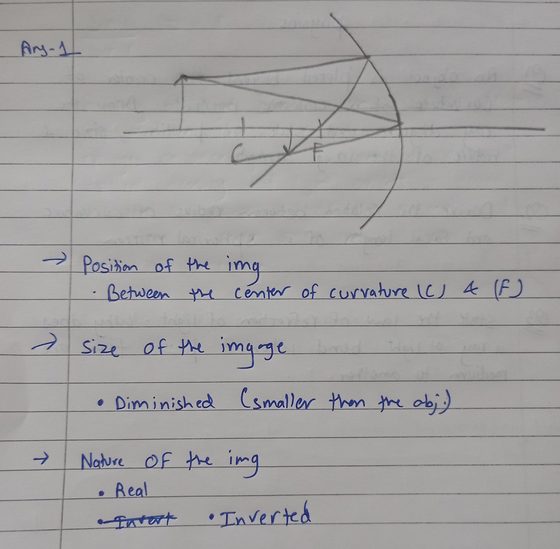
Here it is reading a hand-drawn ray diagram — not text, a drawing. It shows the points she got, the one she missed, and what to do next time. No unexplained scores — ever.
From paper to personalized feedback
Create, evaluate, improve — watch it happen. No new habits for your child; just a phone and a few seconds.
Take a photo
Homework, a worksheet, a class test the teacher already marked — or a paper you made yourself. Your child writes on paper as usual; you photograph the pages.
We read it and mark it
Handwriting, maths working and diagrams. Marks for every question, in about two minutes. A blurry page is sent back for a retake, never guessed at.
You get one clear next step
Not just a score. What she got right, what she missed, and the one topic worth practising this week. One tap makes the practice paper.
Feedback written for your child
Every question gets its own note — what went well, what went wrong, and how to fix it. Sheet by sheet that builds a picture of the mistakes she keeps making and the ideas she has not got yet.
Kind words, not exam stress
Encouraging, specific and private. It is written to build confidence, not to frighten her — and she never has to log in or look at a screen to get it.
Learning Quotient™ — from about month two
One number for how her learning is changing — progress, habit and effort, plus how she says she feels. Never her marks. It needs a few weeks of sheets first, and it tells you the day it is ready.
Want to set the paper yourself? You can make one with AI or import a PDF — it just isn't where most families start.
However the work arrives, it works.
You don't have to set a paper first. Most families just start with whatever is already in the school bag.
Today's homework
Whatever came home in the bag. Photograph the pages and send them in.
A test the teacher already marked
The red pen says 14 out of 20. We tell you which topics went wrong, and what to do.
A paper you set yourself
Make a practice paper with AI by chapter/unit and difficulty level, or import a PDF you already have.
The first sheet tells you about one evening. The tenth tells you about your child.
Marks, feedback, one next step
Everything above, from the first photo.
Progress
Scores over time, by subject and by topic.
Insights
The mistakes that keep coming back — and whether last month's weak spot got fixed.
Learning Quotient
One number for how their learning is changing — progress, habit and effort, plus how they say they feel. Never their marks. It tells you the day it's ready.
Growth Story
A short letter about the term — written from what actually happened, not from a template.
The card on the right is the one you get in week six — shown here with a made-up learner's figures, exactly as the product shows it while you are waiting.
Smart enough to help.
Honest enough to say when it isn't sure.
Every mark cites a rubric point
Never an unexplained score.
A blurry page costs nothing
It asks for a retake instead of guessing — before any AI is spent.
Low confidence goes to review
The answer is flagged for a human, not invented.
You can dispute any mark
One tap from the report. A person looks, and the report is rebuilt.
It's your child's work.
It stays that way.
Your account is isolated from every other. Sheet images are served over short-lived signed links. We never sell or share your data, and we never train our own models on your child's work. Ask for a copy of everything, or for it to be deleted — including just the photographs, while keeping the marks — whenever you like.
- Built for India's DPDP Act. In practice that means you can ask for everything we hold, delete the sheet photographs while keeping the marks, or close the account — and we delete the data within 30 days.
- Encrypted at rest. The sheet images and your details are encrypted on disk, and every image link expires within minutes of being opened.
In your account, today
- Download everything we hold, as one file
- Delete the photographs, keep the marks
- Close the account — we delete the data within 30 days
All three are in Settings → Privacy & data, once you are signed in. What we keep and for how long is set out in the Privacy policy.
Photograph the whole pile after class. Nothing reaches a parent until you approve it.
One capture session for the batch. It splits the stack by student, marks every sheet against your rubric, and hands you a review queue — not a send button. You stay the teacher; it just stops being your Sunday.
Thirty sheets, one sitting
We split the stack by student and only interrupt you when a name will not read. It keeps shooting with no signal and uploads when there is one.
You are the final authority
Not 240 answers to re-mark — 240 shown, a handful outlined. The settled ones are already final; you look only at what it was unsure of, and you can change any mark.
One tap, thirty separate reports
Preview exactly what one parent will get before you send. Each link carries one child and cannot be walked back to the batch.
Teach these, not the syllabus order
Where the whole batch is losing marks, topic by topic, from every sheet you have marked — and a retest on exactly those chapters in two taps.
The parents get something too
Each parent gets their own child's report, signed with your name — every question with its marks, what was missed, what to practise, and where we find it, the mistake circled on the sheet. No app and no login to open it. Your records stay with you: a link shows one child, expires in 30 days, and you can take it back at any time.
No card. No sales call. No school code. Running in about ninety seconds.
Find out for free. Pay when it's earned it.
1 evaluation = 1 complete answer sheet, regardless of page count
A five-page homework is one evaluation, not five.
Free
₹0a month
Free plan — no card required
- 1 child
- 10 AI evaluations a month
- 10 AI question papers a month
- Full marks & feedback
- Basic progress
Pro
₹299/month
or ₹2,999 a year — save ₹589
- All your children
- 100 AI evaluations a month
- 200 AI question papers a month
- Full history, Insights, Learning Quotient
- Practice papers from weak topics
- PDF reports & priority evaluation
Cancel anytime, from your account. Refund & cancellation policy →
Teaching a batch?
A tutor plan is one flat price for the band — never per seat. You pick the band by how many students you have; the monthly allowance is in sheets, because sheets are what actually costs money. First 30 sheets free · no card.
Tutor Free
₹0
No card required
- Up to 25 students
- 30 sheets a month
- 5 AI papers
Tutor 25
₹699/mo
or ₹6,990 a year
- Up to 25 students
- 200 sheets a month
- 30 AI papers
Tutor 50
₹1,199/mo
or ₹11,990 a year
- Up to 50 students
- 400 sheets a month
- 60 AI papers
Tutor 100
₹1,999/mo
or ₹19,990 a year
- Up to 100 students
- 800 sheets a month
- 120 AI papers
Every band includes Batch Capture, batch analytics and parent reports.
One evening's marking. Four minutes of photography.
One child's homework or a batch of thirty. Marks for every question, the mistakes boxed on the page, and the one topic to practise next. Free, no card.
The questions parents actually ask.
Tap a question to open it.
Can it really read my child's handwriting?
Yes — it reads the page as an image, including maths working and diagrams, rather than converting it to text first. That is why a ray diagram or a half-finished sum still gets marked. Scroll back up: the sheets on this page are real ones, marked.
What if the AI marks something wrong?
Dispute it in one tap from the report. A person reviews it, and the report and the analytics are rebuilt from the corrected marks — so the record never disagrees with itself. Answers it isn't confident about are flagged for review before you ever see a mark.
Which boards, classes and subjects?
CBSE · ICSE · IB · state boards, across subjects. For CBSE Classes 5 to 12 we go down to the chapter — 4,601 curated syllabus nodes — so weak topics get a real name. On other boards you describe the topic in your own words instead of picking a chapter, and everything else works the same.
Does my child need an account?
No. There is no login and no app for them. They write on paper as usual; you photograph it. That is the whole point — the screen time stays with you.
How much does it cost?
Free to start, with no card — one child and 10 AI evaluations a month. Pro is ₹299 a month, or ₹2,999 a year, for all your children, 100 evaluations a month, the full history and practice papers. Prices include any taxes that apply. One evaluation is one answer sheet, however many pages it runs to. Cancel any time from your account.
Is my child's data safe?
Your account is isolated from every other, images are served over short-lived signed links, and nothing is used to train models. You can export everything or delete it yourself — including the photographs, while keeping the marks.
How long does one sheet take?
About two minutes for a typical multi-page sheet. You don't wait on the screen — the report arrives when it's done. A page that came out blurred is sent back for a retake first, which costs you a second and saves you a wrong result.